import requests

url = "https://www.cnn.com"
timestamp = "20000815"  # August 15, 2000

# Pass query arguments as a params dictionary — requests handles the URL encoding, which matters here because one of the values is itself a URL
api_url = "https://archive.org/wayback/available"
response = requests.get(api_url, params={"url": url, "timestamp": timestamp})
data = response.json()

# Check if a snapshot is available
if data["archived_snapshots"]:
    snapshot = data["archived_snapshots"]["closest"]
    print(f"Snapshot available: {snapshot['available']}")
    print(f"URL: {snapshot['url']}")
    print(f"Timestamp: {snapshot['timestamp']}")
else:
print("No snapshot available near this date")7 Archived Web Pages and the Wayback Machine
TipLearning Objectives
- Explain the Internet Archive’s role as a public infrastructure for web preservation
- Navigate the Wayback Machine by hand — its calendar, toolbar, capture URLs, and About this capture panel — and diagnose why an archived page is broken, missing, or incomplete
- Query the Wayback Machine’s Availability API and CDX Server API to find historical snapshots
- Retrieve and parse historical page content to track changes over time
- Apply basic NLP techniques (tokenization, stopword removal, bag-of-words) to measure document similarity
- Serialize scraped data to JSON files for persistence and reproducibility
TipCompanion Notebook
Run this chapter’s code as you read: open the companion notebook (see Appendix A for all of them).
7.1 The Web Is Not Permanent
Web pages change, disappear, and get redesigned constantly. A Pew Research Center study found that 38% of the web pages that existed in 2013 were no longer accessible a decade later — in most cases because a single page had been deleted or removed from a website that otherwise still worked (Chapekis et al. 2024). This decay is called link rot. For researchers, this impermanence creates a fundamental challenge: how do you study something that might not be there tomorrow? And how do you study how something has changed over time when only the current version is visible?
The Internet Archive, founded by Brewster Kahle in 1996, addresses this challenge by archiving the web. Its Wayback Machine, open to the public since 2001, passed one trillion archived web pages in October 2025, creating a historical record of the web that is freely accessible to anyone. For web data scientists, the Wayback Machine is both a data source and a form of the counter-erosion infrastructure described in Chapter 3 — a community-governed resource that preserves access to web content even as platforms and governments take pages down.
7.2 Using the Wayback Machine by Hand
Every API call later in this chapter asks a question you can ask in a browser first: which captures of this page exist, and what did each one contain? Start with facebook.com, whose archival record begins more than five years before Facebook launched.
7.2.1 Finding a Capture
Go to web.archive.org, type facebook.com into the search box, and press Enter. The results open on the Calendar tab, which summarizes everything the Archive holds for that address. In September 2026, the summary line read “Saved 8,516,745 times between December 12, 1998 and September 24, 2026.” Below it, a histogram shows one bar per year, taller where the year holds more captures. Click a year to load its calendar (Figure 7.1).
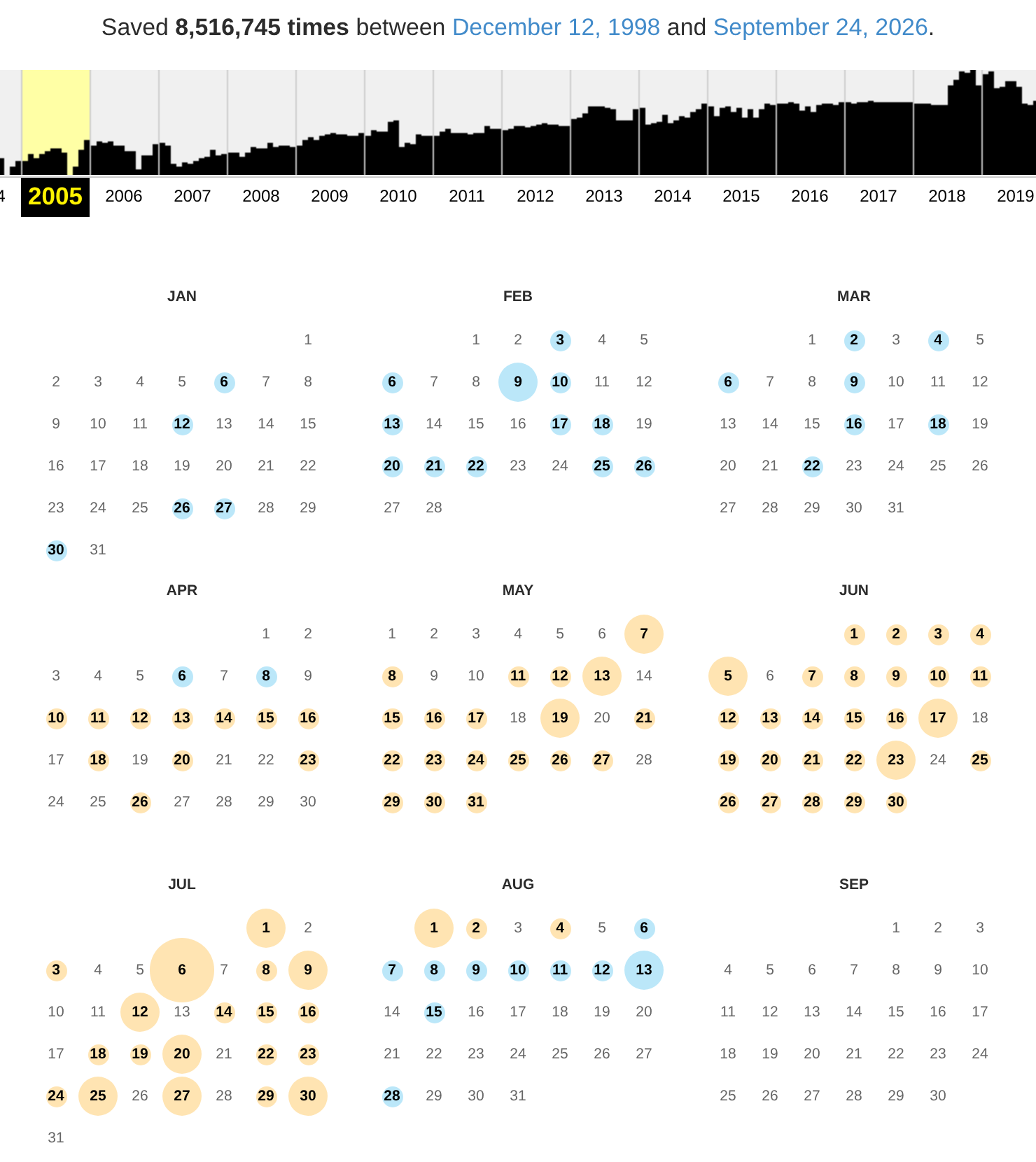
facebook.com in September 2026, with 2005 selected. Circle size shows how many captures a day holds; circle color shows the HTTP status code the crawler received.
Each circle marks a day with at least one capture, and the bigger the circle, the more captures that day. Hover over a circle to list that day’s capture times, then click one to open the page as the crawler saw it. The circles’ colors carry information too; “Reading Captures Critically” below decodes them.
Now open a capture from before Facebook existed. Click the 2004 bar in the histogram and choose January 21. The page in Figure 7.2 belongs to AboutFace, “The first name in directories,” a company selling software for publishing employee and member directories. Its pitch to schools and colleges: “Eliminate the need for printed facebooks.” Two weeks later, on February 4, 2004, Thefacebook launched at a different address, thefacebook.com. In 2005 the company bought facebook.com for $200,000 and dropped “The” from its name.
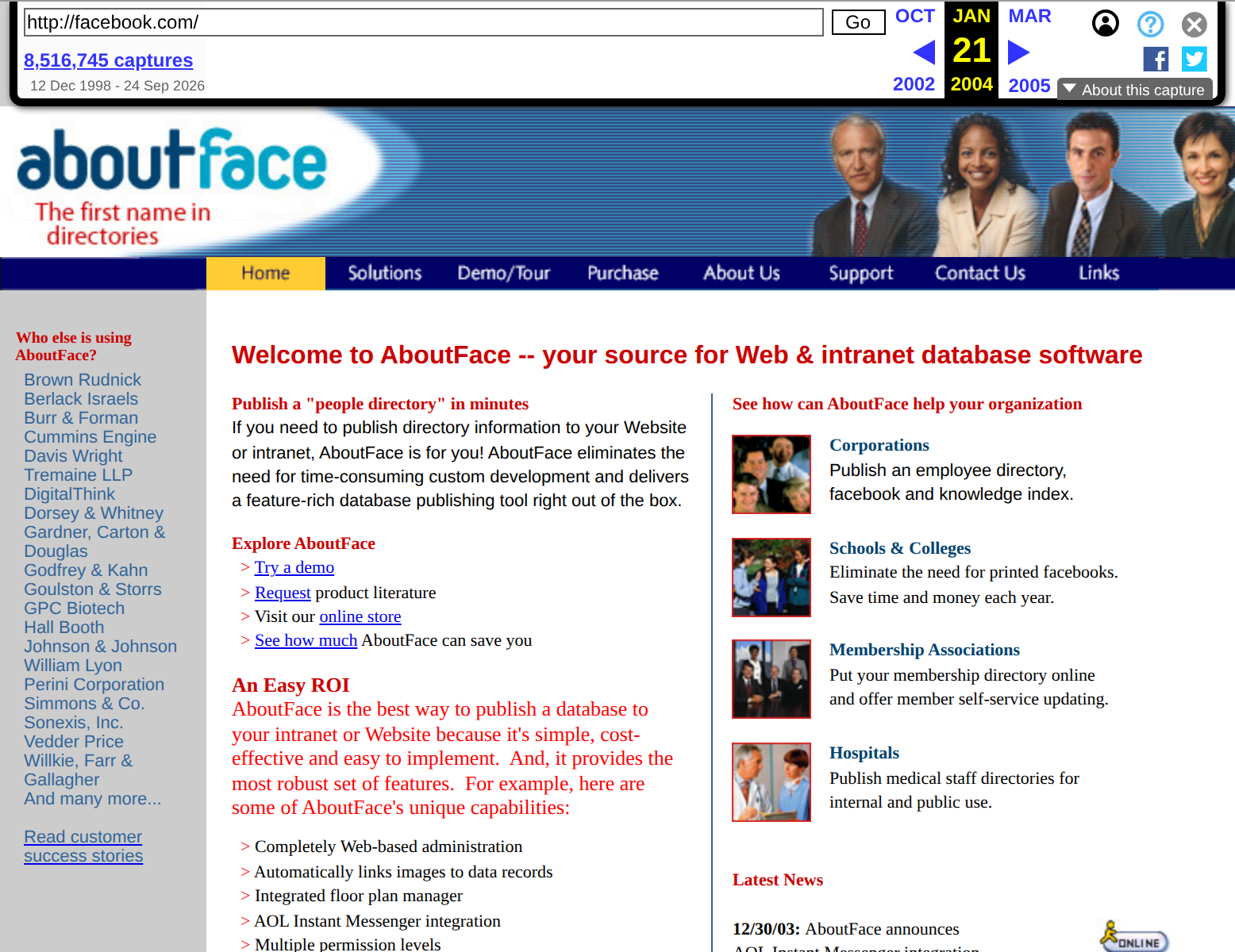
facebook.com on January 21, 2004, two weeks before Thefacebook launched, shown in September 2026. The Wayback toolbar runs across the top.
7.2.2 Moving Through Time
Every archived page opens under the Wayback toolbar, visible across the top of Figure 7.2. On the left are the address you are viewing, in a box you can edit, and under it the number of captures of that address, which links to the full calendar. On the right is the date of the capture you are viewing, with arrows that step to the previous and next captures. In a window wider than about 1,100 pixels, a strip chart of captures by year also appears between them, like the calendar’s histogram.
The browser’s address bar holds the same information in a form you can edit:
https://web.archive.org/web/20040212031928/http://www.thefacebook.com/The 14 digits after /web/ are a timestamp — year, month, day, hour, minute, and second, in Coordinated Universal Time (UTC) — so this capture was made on February 12, 2004, at 03:19:28 UTC. Everything after the timestamp is the original address. Because the address is the query, you can rewrite it by hand:
- Shorten the timestamp.
web.archive.org/web/2004/thefacebook.comsends you to the capture closest to the date you gave, so you never need to know an exact capture time. - End the timestamp with an asterisk to get a calendar instead of a page:
web.archive.org/web/2005*/facebook.comopens the view in Figure 7.1. - End the address with an asterisk to list every archived address that starts with it:
web.archive.org/web/*/thefacebook.com/*lists the pages the Archive holds from Thefacebook’s site.
The Availability API and the CDX Server API later in this chapter answer these same questions in a form your code can read.
When the Archive has no capture of a page you need, you can make one: paste the address into Save Page Now, and the Archive captures the page on the spot and shows you the new capture.
7.2.3 About This Capture
At the right end of the toolbar, the About this capture button opens a panel with two sections (Figure 7.3).
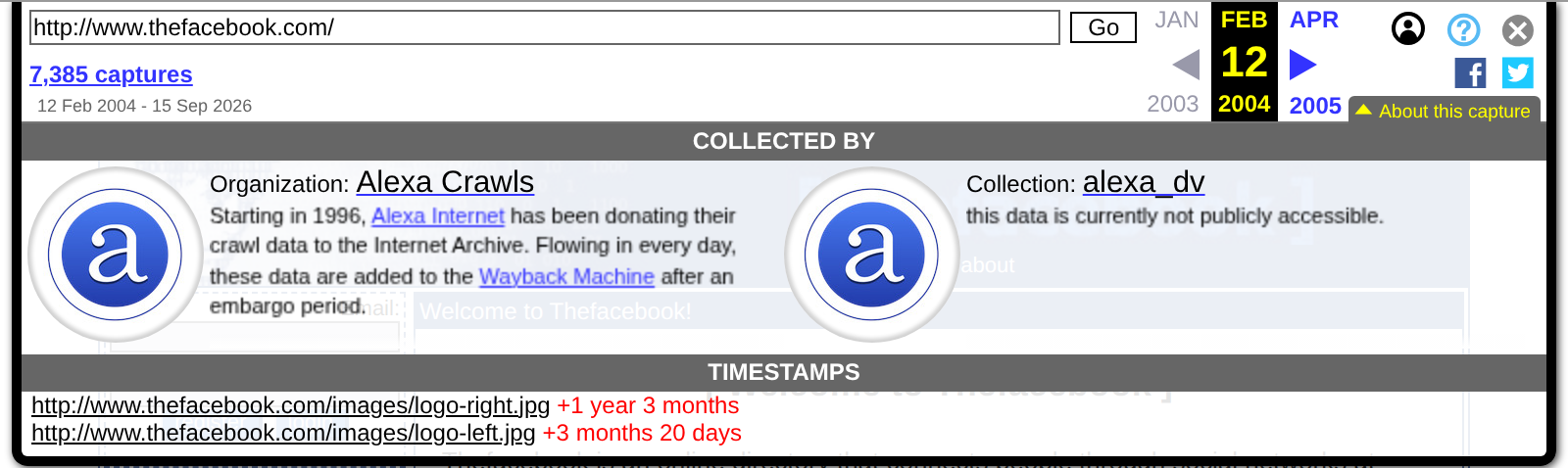
thefacebook.com, shown in September 2026: who collected it, and when each embedded image was saved relative to the page.
Collected by names the organization and collection behind the capture. This one came from Alexa Crawls: “Starting in 1996, Alexa Internet has been donating their crawl data to the Internet Archive.” Alexa Internet was a web-traffic company that Brewster Kahle co-founded in 1996, the same year he founded the Archive. Other captures name a university library’s collection or a volunteer group’s rescue project, so the panel tells you whether a page was swept up by a broad crawl or saved on purpose.
Timestamps lists the files embedded in the page — images, scripts, stylesheets, frames — with how far each file’s capture time falls from the page’s. On this capture, images/logo-left.jpg was saved three months and twenty days after the page, and images/logo-right.jpg more than a year after. When the Wayback Machine replays a page, it fills in each embedded file with the nearest capture of that file it has, whenever that was. A replayed page is a composite, assembled from moments that can be months or years apart.
TipTry It: Before They Were Famous
Some of the web’s best-known addresses belonged to someone else, or to something much smaller, before they were famous. Open these captures and look around:
google.comon November 11, 1998, its earliest capture: “Welcome to Google,” with one link to the “Google Search Engine Prototype” and another to a “Might-work-some-of-the-time-prototype that is much more up to date.”thefacebook.comon February 12, 2004, eight days after launch, when it was open only at Harvard University.x.comin April 1997, when it called itself “not nearly the worst place on the web!!!”, and again on November 14, 1999, when it belonged to X.com, the online bank Elon Musk co-founded that year. X.com merged with Confinity, the company behind PayPal, in 2000; Musk bought the domain back from PayPal in 2017, and X, formerly Twitter, began using it in 2023.
Then look up a site you know well — your high school, your hometown newspaper, a band you liked in middle school — and find its oldest capture.
7.3 Reading Captures Critically
A capture records what one crawler received at one moment. Before you trust one, read it the way you would read any other source: check what the crawler got, what is missing, and why this page was captured at all.
7.3.1 What the Colors Mean
The circles on the calendar are colored by the HTTP status code (Chapter 5) the crawler received:
- Blue: 2xx, a success; the crawler got a page.
- Green: 3xx, a redirect to another address.
- Orange: 4xx, a client error such as 403 Forbidden or 404 Not Found.
- Red: 5xx, a server error.
Read Figure 7.1 with that key. Until April 8, 2005, facebook.com returned blue captures of AboutFace’s page. From April 10 to early August, the circles turn orange: the server answered 403 Forbidden. From August 6 they are blue again, and a capture a week later shows Thefacebook’s home page, now served from facebook.com. By August, the domain had changed hands. The archive recorded each refusal accurately, and when you query the CDX Server API later in this chapter, those refusals come back as rows with a statuscode of 403 — one reason the chapter’s queries filter for 200.
Not every failure shows up in color. Many sites answer a request for a missing page with a 200 and a friendly “Page not found” message, so the crawler records a success. These soft 404s look blue on the calendar; you catch them only by opening the capture and reading it.
7.3.2 Broken and Missing Captures
A blue circle means the crawler got the page’s HTML. It says nothing about the images, scripts, and stylesheets the page needed. Open x.com on November 14, 1999, and you get Figure 7.4: X.com’s pre-launch page, with every visible image broken. The HTML was saved that day; its images were not. When the Wayback Machine replays a page, it fetches each embedded file from that file’s nearest capture — but six of this page’s seven images have no good capture at all. The Archive’s first captures of them, from August and September 2000, are all 404 errors. Only the seventh, a transparent spacer image, was ever saved successfully, in April and May 2000.
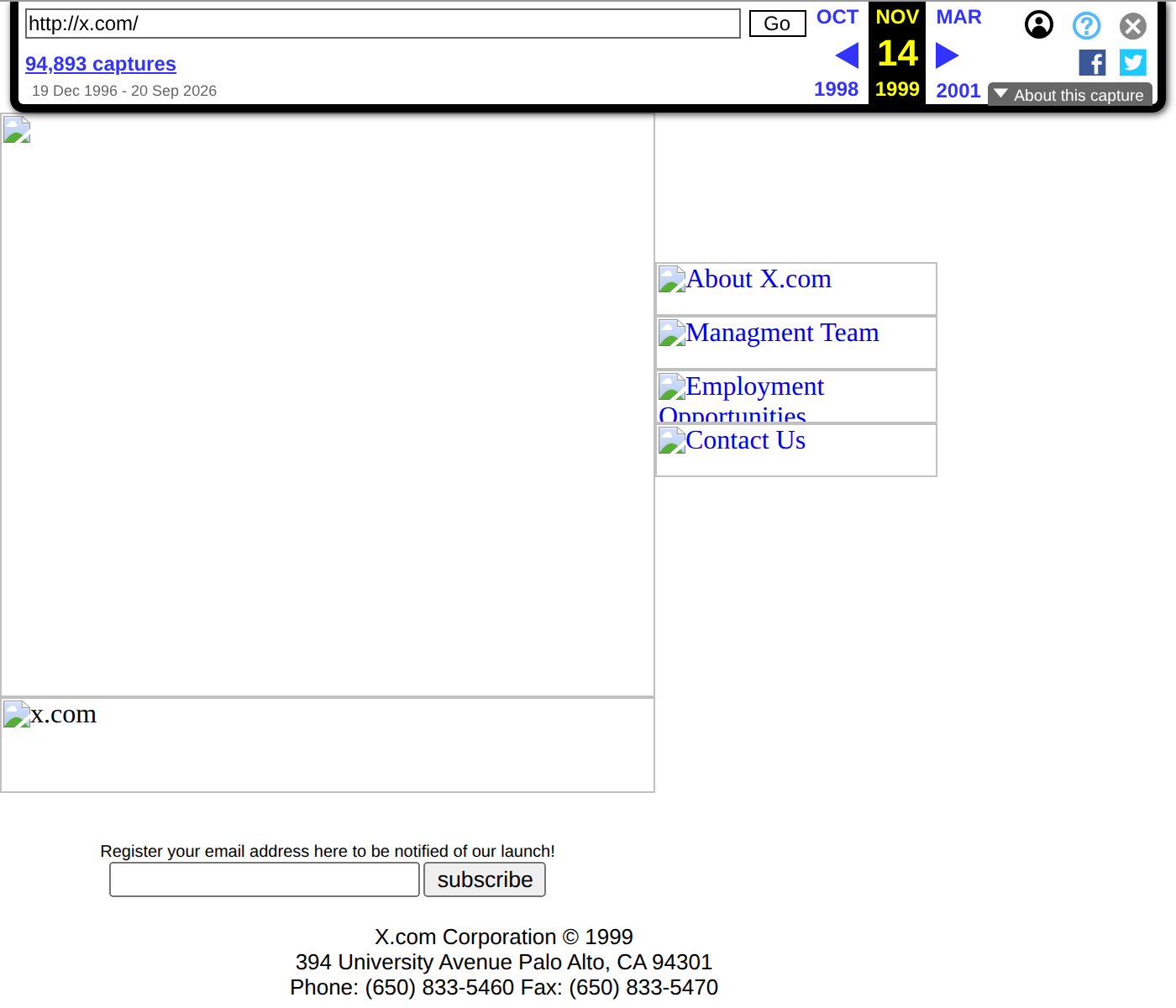
x.com on November 14, 1999, shown in September 2026. The page’s HTML was captured that day, but none of its images were, so replay shows broken-image icons.
The same kind of gap takes other forms:
- Files on other hosts. Images, fonts, and scripts served from another domain or a content delivery network had to be captured separately. Often they weren’t.
- Content built by JavaScript. A page that fetches its content after it loads (Chapter 8) can archive as an empty shell, because the crawler never requested the data the page’s scripts would have asked for.
- Pages never captured. If no crawler visited an address, the Wayback Machine tells you it “has not archived that URL” and offers to search for other archived pages on the same site. The content you want may live at a different address.
- Subdomains. Each subdomain has its own capture history:
m.facebook.comanddevelopers.facebook.comare separate fromfacebook.com. The Wayback Machine does, however, treat an address with or withoutwww., and overhttporhttps, as the same page. - Logins and paywalls. Crawlers do not log in. Anything behind a login was never captured; at best, the archive holds the login page.
- Exclusions. Site owners can ask the Internet Archive to remove their pages from the Wayback Machine, and excluded addresses show no captures at all.
7.3.3 Why Some Sites Are Archived Better Than Others
In September 2026, the Wayback Machine held 20,394,311 captures of google.com, 8,516,745 of facebook.com, and 94,893 of x.com. Most pages you might study have far fewer. Crawlers find pages by following links, so a page that many sites link to gets visited again and again, while a page few sites link to may be visited rarely or never. For most of its history, x.com was a little-used address, and its calendar shows its captures climbing only in recent years.
Other captures are deliberate. Anyone can use Save Page Now. The volunteers of Archive Team rush to copy sites that are about to shut down. Libraries and universities build curated collections with the Archive’s Archive-It service. The End of Term Web Archive has captured U.S. federal government websites at the end of every presidential term since 2008.
The result is a sample of the web, not a census. It overrepresents popular, well-linked, and deliberately preserved pages, and it captures them on the crawlers’ schedule rather than the schedule your research question needs. Whenever your data come from the Wayback Machine, describe those biases in your methods, as the graduate extension at the end of this chapter asks you to.
7.4 Inspecting Archived Pages
Everything you learned about browser developer tools in Chapter 5 works on archived pages. Open the February 12, 2004 capture of Thefacebook, right-click the page, and choose Inspect (Figure 7.5).
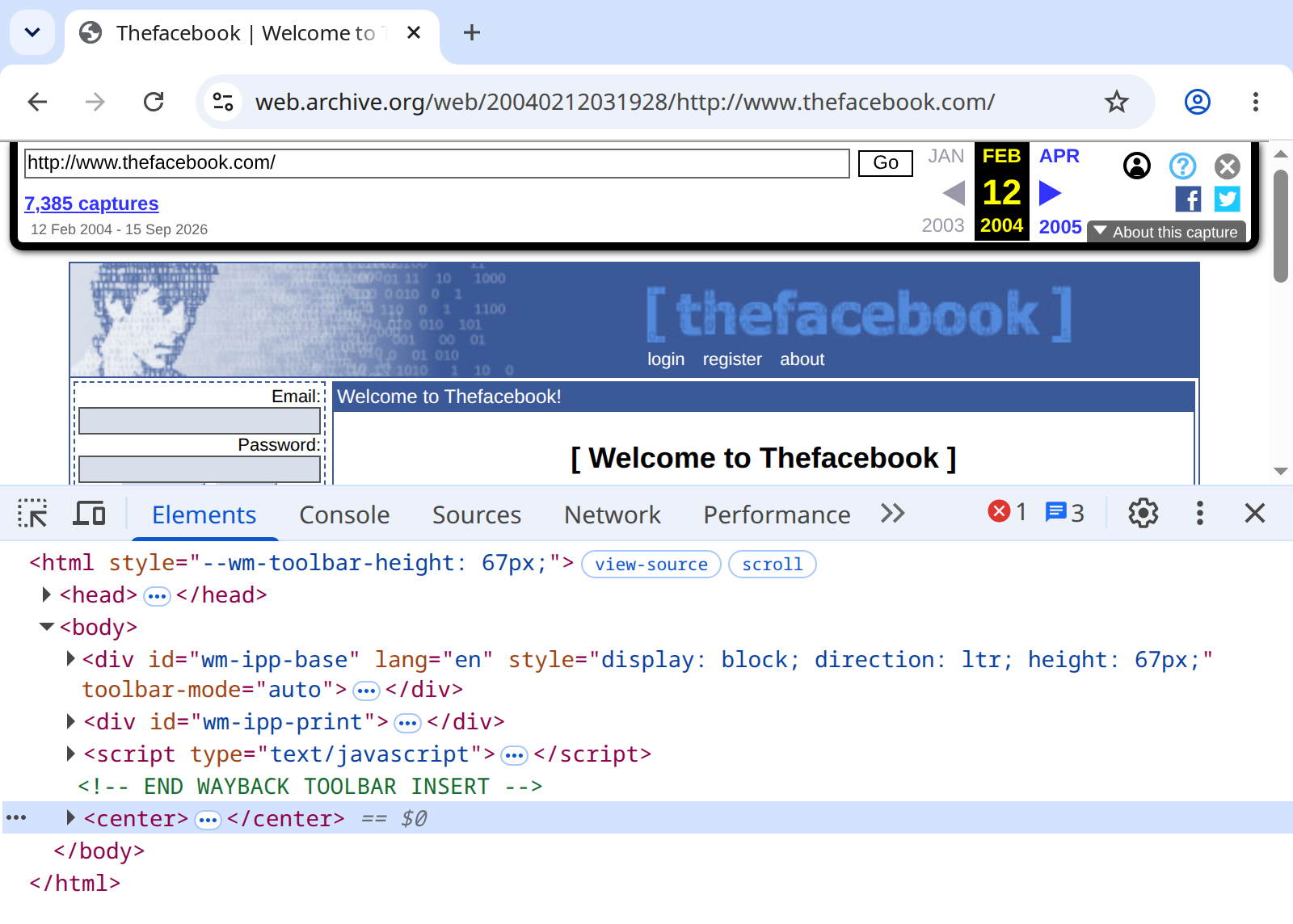
thefacebook.com, September 2026. The Wayback toolbar comes first in the page body; Thefacebook’s own markup starts after the comment that ends the toolbar insert.
The page body starts with material the archive added. <div id="wm-ipp-base"> holds the toolbar, followed by a second <div>, a <script>, and a comment that marks the end of the insertion: <!-- END WAYBACK TOOLBAR INSERT -->. Thefacebook’s own markup begins after that comment, with the <center> element that wraps the whole 2004 page. Expand <head> and you find more additions, including a script named wombat.js that rewrites addresses while the page runs, so that whatever the page’s own scripts request comes from the archive instead of the live web.
Select one of the page’s images and look at its src, which points to /web/20040212031928im_/http://www.thefacebook.com/images/logo-left.jpg. The archive rewrote the address to point into itself, and the letters after the timestamp are a flag telling the Wayback Machine how to serve the file: im_ means “as an image.” You will meet another flag, id_, in the next section.
Other details survive exactly as the crawler received them. Every link on the page carries a session ID, as in register.php?PHPSESSID=df5154e5…. PHP, the language Thefacebook was written in, adds that ID to every link when a visitor arrives without a session cookie, and crawlers never carry one. The capture shows what the server sent a crawler on one visit in 2004; a logged-in Harvard student would have seen a different page.
The wrapped page is fine for reading and a problem for measurement. Thefacebook’s 2004 home page contained no <script> tags at all; request the same capture with requests.get() and the HTML you get back has five, every one of them the archive’s.
7.5 Research Designs with Archived Pages
Studies built on archived web pages tend to follow a handful of designs:
- One site over time. Retrieve a page at regular intervals and measure how it changed — the design this chapter builds with Facebook’s Terms of Service. At scale, Amos et al. (2021) used the Wayback Machine to assemble more than a million privacy policies from over 130,000 websites across two decades, and traced, among other things, how those policies changed in response to Europe’s General Data Protection Regulation (GDPR).
- Many sites over time. Sample many sites across the years and measure how a practice spread. Lerner et al. (2016) reconstructed third-party web tracking from 1996 to 2016 and found that it grew in both prevalence and complexity. Before measuring anything, they evaluated where the Wayback Machine’s record of past tracking was imperfect.
- Disappearance. Use an archive to establish what once existed, then check what survives on the live web. The Pew Research Center study behind this chapter’s opening statistic drew its sample of pages from Common Crawl, another web archive (Chapekis et al. 2024).
- Before and after an event. Compare captures from either side of an election, a lawsuit, or a policy change. Starting with the 2017 presidential transition, the Environmental Data & Governance Initiative monitored tens of thousands of federal environmental web pages and compared Wayback Machine captures to document the removal of climate change information, particularly at the Environmental Protection Agency (Environmental Data & Governance Initiative 2018).
Arora et al. (2016) is a methods guide to mining archived websites, written for social scientists. Every one of these designs starts with the two questions you just answered by hand — which captures exist, and what did each one contain? The rest of this chapter answers them in code.
7.6 The Availability API
The simplest way to check whether the Wayback Machine has a snapshot of a URL is the Availability API:
The API returns the closest snapshot to your requested timestamp. Before you retrieve it, recall what the Inspector showed you: a snapshot URL like https://web.archive.org/web/20000815052826/http://www.cnn.com/ does not return the page exactly as it was captured. It returns the page wrapped, with the archive’s scripts injected and its links, scripts, and image references rewritten to point back into the archive; a browser gets the toolbar as well. That is convenient for browsing but poisonous for measurement — counts of links, scripts, and images, and even text length, will include the archive’s scaffolding along with the original page. Just as im_ asked for an image, the id_ flag after the timestamp (.../web/20000815052826id_/http://www.cnn.com/) asks for the original capture, unmodified. The tradeoff is that id_ returns the rawest form of the capture: relative links are left unresolved and the page may not render nicely in a browser. For measurement, raw is exactly what you want.
from bs4 import BeautifulSoup

# Append id_ to the timestamp to request the original, unmodified capture — no Wayback toolbar, no rewritten links
ts = snapshot["timestamp"]
archived_url = snapshot["url"].replace(ts, ts + "id_")

archived_response = requests.get(archived_url)
soup = BeautifulSoup(archived_response.text, "html.parser")

# Extract links from the year-2000 version of CNN
links = soup.find_all("a")
print(f"Number of links on CNN in August 2000: {len(links)}")
7.6.1 Comparing Multiple Snapshots
A single historical snapshot is interesting; comparing snapshots across time is where the real research value lies. Let us retrieve CNN’s homepage at three different points in history and see how the web has evolved:
import time
import requests
from bs4 import BeautifulSoup

def get_snapshot_stats(url, timestamp, headers=None):
    """Retrieve a Wayback snapshot and compute basic statistics."""
    try:
        api_response = requests.get(
            "https://archive.org/wayback/available",
            params={"url": url, "timestamp": timestamp},
            headers=headers,
        )
        api_response.raise_for_status()
        api_data = api_response.json()

        if not api_data.get("archived_snapshots"):
            return None

        # Fetch the original capture (id_), not the toolbar-wrapped version, so the statistics measure the page and only the page
        closest = api_data["archived_snapshots"]["closest"]
        snapshot_url = closest["url"].replace(
            closest["timestamp"], closest["timestamp"] + "id_"
        )
        page_response = requests.get(snapshot_url, headers=headers)
        page_response.raise_for_status()
    except requests.exceptions.RequestException as e:
        print(f"Request failed for {url} at {timestamp}: {e}")
        return None

    soup = BeautifulSoup(page_response.text, "html.parser")

    return {
        "year": timestamp[:4],
        "num_links": len(soup.find_all("a")),
        "text_length": len(soup.get_text()),
        "num_images": len(soup.find_all("img")),
        "num_scripts": len(soup.find_all("script")),
    }

# Compare CNN across three eras
timestamps = ["20000815", "20120815", "20240815"]
stats = []
for ts in timestamps:
    result = get_snapshot_stats("www.cnn.com", ts)
    if result:
        stats.append(result)
time.sleep(2) # Be respectful of the ArchiveThe numbers tell a story about the web’s evolution: pages have grown dramatically in complexity, with more links, more text, more images, and — most strikingly — far more JavaScript. The 2000-era web was largely static HTML; the 2024 web is a JavaScript application that happens to render as a web page. This increasing complexity is part of why the techniques in Chapter 8 become necessary for modern scraping.
You can extend this approach to any pair of sites or time periods. Comparing how two competing news organizations’ homepages evolved reveals different editorial strategies. Tracking a government agency’s page across presidential administrations can reveal shifts in priorities and transparency. The Wayback Machine turns the web from a snapshot medium into a longitudinal data source — one where you can measure change rather than merely observing it.
Note the importance of the time.sleep(2) call in the loop above. The Internet Archive is a nonprofit that provides this service for free. Aggressive scraping degrades the experience for everyone. Treat the Archive with the same courtesy you would extend to any community resource — use it responsibly, and it will be there when you need it.
7.7 The CDX Server API
The Availability API finds one snapshot near a date. The CDX Server API lets you query the entire history of snapshots for a URL, which is essential for longitudinal research:
import requests
import pandas as pd

# Query all snapshots of Facebook's Terms of Service
cdx_url = "https://web.archive.org/cdx/search/cdx"
params = {
    "url": "facebook.com/terms",
    "output": "json",
    "fl": "timestamp,original,statuscode,length",
    "filter": "statuscode:200",  # Server-side: only successful captures
    "collapse": "digest",        # Server-side: skip consecutive identical captures
}

response = requests.get(cdx_url, params=params)
data = response.json()

# First row is column headers, rest is data
df = pd.DataFrame(data[1:], columns=data[0])
df["timestamp"] = pd.to_datetime(df["timestamp"], format="%Y%m%d%H%M%S")
df["length"] = pd.to_numeric(df["length"], errors="coerce")

print(f"Total snapshots: {len(df)}")
print(f"Date range: {df['timestamp'].min()} to {df['timestamp'].max()}")
Two of these parameters do server-side filtering that saves you cleanup work later. The filter=statuscode:200 parameter returns only successful captures, so failed requests and redirects never reach your DataFrame. The collapse=digest parameter drops consecutive captures whose content hash is identical — the Archive often captures a page daily even when nothing changed, and collapsing on digest keeps one capture per distinct version. While developing, it is also worth adding "limit": 100 to cap the response at a manageable size until your code works.
You can visualize how frequently the page was captured and how its size changed over time:
import matplotlib.pyplot as plt

fig, axes = plt.subplots(2, 1, figsize=(12, 8), sharex=True)

# Snapshot frequency over time
df.set_index("timestamp").resample("ME").size().plot(ax=axes[0])
axes[0].set_ylabel("Snapshots per month")
axes[0].set_title("Wayback Machine Capture Frequency")

# Page size over time
df.set_index("timestamp")["length"].plot(ax=axes[1])
axes[1].set_ylabel("Page size (bytes)")
axes[1].set_title("Page Size Over Time")

plt.tight_layout()
plt.show()
7.7.1 Filtering and Analyzing CDX Data
The raw CDX feed includes every capture attempt — failed requests, redirects, and duplicate captures that can skew your analysis. Because our query already filtered to status 200 and collapsed identical captures on the server side, the DataFrame arrives analysis-ready; had you omitted those parameters, the equivalent pandas filter would be df[df["statuscode"] == "200"]. Prefer the server-side version: it transfers less data and leaves less cleanup code to maintain.
# Every row is already a successful, distinct capture (filtered server-side), so we can go straight to trend analysis
df_ok = df.set_index("timestamp")

# Resample to quarterly frequency
quarterly = df_ok.resample("QS").agg(
    captures=("length", "size"),
    mean_size=("length", "mean"),
)

# Compute year-over-year page size growth
yearly = df_ok.resample("YS").agg(mean_size=("length", "mean"))
print(yearly.tail(10))
fig, axes = plt.subplots(2, 1, figsize=(12, 8), sharex=True)
quarterly["captures"].plot(ax=axes[0])
axes[0].set_ylabel("Captures per quarter")
axes[0].set_title("Capture Frequency (Status 200 Only)")
quarterly["mean_size"].plot(ax=axes[1])
axes[1].set_ylabel("Mean page size (bytes)")
axes[1].set_title("Average Page Size Over Time")
plt.tight_layout()
plt.show()Status codes matter because CDX data records every capture attempt, not just successful ones. If you want to study the failures, drop the filter parameter and look at what comes back: a spike in 301 (redirect) codes might indicate a site restructuring; a cluster of 503 (Service Unavailable) codes might indicate a period of downtime. These metadata are themselves interesting — they tell you about the infrastructure behind the page, not just its content.
Page size trends are particularly revealing. A steady increase in page size often correlates with the addition of tracking scripts, advertising frameworks, and JavaScript-heavy interfaces. A sudden jump might indicate a redesign; a sudden drop might mean the site moved content behind a login wall. When combined with the content analysis techniques later in this chapter, CDX metadata provides the quantitative backbone for your longitudinal research — telling you how much changed while bag-of-words analysis tells you what changed.
7.8 Tracking Policy Changes Over Time
A current research project explores how social media platforms’ terms of service have evolved. Let us track changes in Facebook’s Terms of Service by retrieving content at regular intervals.
7.8.1 Generating Date Ranges
7.8.2 Retrieving Historical Content
import time
from datetime import datetime

fb_tos_url = "facebook.com/terms"

def get_wayback_content(url, date, headers=None):
    """Retrieve a page from the Wayback Machine closest to a given date.

    Parameters
    ----------
    url : str
        The original URL (without http://)
    date : datetime
        The target date for the snapshot
    headers : dict, optional
        HTTP headers for the request

    Returns
    -------
    dict or None
        Dictionary with 'timestamp', 'url', 'content', and 'word_count',
        or None if no snapshot exists or the request failed
    """
    timestamp = date.strftime("%Y%m%d")

    try:
        api_response = requests.get(
            "https://archive.org/wayback/available",
            params={"url": url, "timestamp": timestamp},
            headers=headers,
        )
        api_response.raise_for_status()
        api_data = api_response.json()

        if not api_data.get("archived_snapshots"):
            return None

        # Fetch the original capture (id_) so the extracted text doesn't include the Wayback toolbar and banner
        closest = api_data["archived_snapshots"]["closest"]
        snapshot_url = closest["url"].replace(
            closest["timestamp"], closest["timestamp"] + "id_"
        )
        page_response = requests.get(snapshot_url, headers=headers)
        page_response.raise_for_status()
    except requests.exceptions.RequestException as e:
        print(f"Request failed for {url} near {timestamp}: {e}")
        return None

    soup = BeautifulSoup(page_response.text, "html.parser")

    # Extract text content
    text = soup.get_text(separator=" ", strip=True)

    return {
        "timestamp": closest["timestamp"],
        "url": snapshot_url,
        "word_count": len(text.split()),
        "content": text  # Keep the full text; the similarity analysis compares whole documents
    }
7.8.3 Collecting the History
The function retrieves one snapshot; a loop over the quarterly dates assembles the history. Note where the time.sleep() lives — in the loop, between requests, just as in Chapter 6 — and that failed retrievals (returned as None) are simply skipped rather than crashing the run:
results = []
for date in dates:
    print(f"Fetching snapshot near {date.date()}...")
    result = get_wayback_content(fb_tos_url, date)
    if result is not None:
        results.append(result)
    time.sleep(1)  # Rest between iterations — the Archive is a nonprofit

print(f"Retrieved {len(results)} snapshots from {len(dates)} time points")
# Retrieved 68 snapshots from 77 time points
7.8.4 Serializing Data
Once you have collected historical content, save it so you do not need to re-scrape:
7.8.5 Caching Raw Captures
Serializing your final results is one half of a reproducible workflow. The other half is caching each raw capture as you fetch it, so that re-running the collection loop never re-downloads something you already have:
import os

os.makedirs("wayback_cache", exist_ok=True)

def get_wayback_content_cached(url, date, headers=None):
    """Fetch a snapshot, reading from and writing to a local cache."""
    # Key the cache file by the snapshot's target date
    cache_path = f"wayback_cache/{date.strftime('%Y%m%d')}.json"

    if os.path.exists(cache_path):  # Already fetched — skip the network
        with open(cache_path, "r") as f:
            return json.load(f)

    result = get_wayback_content(url, date, headers=headers)
    if result is not None:  # Save for next time
        with open(cache_path, "w") as f:
            json.dump(result, f)
    return result
Swap this wrapper into the collection loop and your pipeline gains two properties worth having. It is polite: no matter how many times you restart the loop while debugging, each snapshot is requested from the Archive exactly once. And it is reproducible: your analysis is anchored to the exact content you retrieved, even if a capture later becomes unavailable or the service is down when you rerun your notebook.
7.9 Document Similarity with Bag-of-Words
To measure how much a document changed between versions, you can use a bag-of-words approach. This technique represents each document as a vector of word frequencies, ignoring word order, and then measures the similarity between vectors.
The code below uses gensim, which chapter 1’s webdata environment includes. An environment made before October 2026 doesn’t have it: add it once, in a terminal where webdata is active, with conda install -c conda-forge gensim, then restart your Jupyter kernel. pip install gensim won’t do, because PyPI, where pip looks, has no gensim built for Python 3.14 (October 2026); conda-forge does. An import gensim that runs without an error means it worked.
Stopwords, such as the, and, and of, are too common to tell two versions of a document apart, so the code drops them before counting. The list comes from the web like any other data: the book keeps it as a plain-text file, one word per line, and requests fetches it. It holds the 198 English stopwords of NLTK, a Python library for language processing, which took them from the Snowball project.
import requests
from gensim.utils import simple_preprocess

# The book's stopword list: a plain-text file with one word per line
STOPWORDS_URL = "https://raw.githubusercontent.com/cuinfoscience/Web-Data-Science-Book/main/data/stopwords-en.txt"
headers = {"User-Agent": "WebDataScience/1.0 (your-email@colorado.edu)"}

response = requests.get(STOPWORDS_URL, headers=headers, timeout=30)
response.raise_for_status()
stop_words = set(response.text.split())  # split() breaks the text at every line break
print(f"{len(stop_words)} stopwords, such as {sorted(stop_words)[:5]}")
# 198 stopwords, such as ['a', 'about', 'above', 'after', 'again']

def preprocess_document(text):
    """Tokenize, lowercase, and remove stopwords from a document."""
    tokens = simple_preprocess(text)  # Tokenize and lowercase
    return [token for token in tokens if token not in stop_words]

# Preprocess two versions of the ToS
doc_v1 = preprocess_document(results[0]["content"])
doc_v2 = preprocess_document(results[-1]["content"])

print(f"Version 1 tokens: {len(doc_v1)}")
print(f"Version 2 tokens: {len(doc_v2)}")
Using gensim’s dictionary and bag-of-words tools, you can build a corpus and compute similarity:
from gensim import corpora, similarities

# Build a dictionary mapping words to IDs
documents = [doc_v1, doc_v2]
dictionary = corpora.Dictionary(documents)

# Convert documents to bag-of-words vectors
corpus = [dictionary.doc2bow(doc) for doc in documents]

# Compute similarity
index = similarities.SparseMatrixSimilarity(corpus, num_features=len(dictionary))
sims = index[corpus[0]]
print(f"Similarity between versions: {sims[1]:.3f}")
# 1.0 = identical, 0.0 = completely different
7.9.1 Visualizing Document Change Over Time
The bag-of-words similarity measure tells you how similar two documents are, but plotting similarity between consecutive versions over time creates a “change timeline” — a visual record of when and how much a document evolved:
from gensim import corpora, similarities

# Preprocess every version with the same function, so the tokens and stopwords match
processed_docs = [preprocess_document(r["content"]) for r in results if r and r.get("content")]

# Build dictionary and corpus
dictionary = corpora.Dictionary(processed_docs)
corpus = [dictionary.doc2bow(doc) for doc in processed_docs]

# Compute similarity between consecutive versions
change_scores = []
index = similarities.SparseMatrixSimilarity(corpus, num_features=len(dictionary))
for i in range(1, len(corpus)):
    sim = index[corpus[i-1]][i]
    change_scores.append(1 - sim)  # Convert similarity to change score

# Plot the change timeline
plt.figure(figsize=(12, 4))
plt.plot(range(len(change_scores)), change_scores, marker="o")
plt.xlabel("Version Transition")
plt.ylabel("Change Score (0 = identical, 1 = completely different)")
plt.title("Document Change Over Time")
plt.tight_layout()
plt.show()
Spikes in this timeline correspond to major revisions — a new Terms of Service policy, a site redesign, or a significant content update. By cross-referencing these spikes with real-world events (a data breach, a regulatory action, a public controversy), you can begin to tell a story about why the document changed, not just that it changed. This kind of temporal analysis is at the heart of longitudinal web research.
The change score visualization complements the CDX analysis from earlier in this chapter. CDX data tells you how often the page was captured and how its size changed; the change timeline tells you how different consecutive versions are from each other. Together, they create a multi-dimensional picture of a document’s evolution. A page might be captured frequently but change very little (a stable, well-maintained site), or captured infrequently but show dramatic changes between captures (a site that undergoes periodic major overhauls).
You can also extend this approach beyond consecutive comparisons. Computing pairwise similarity between all versions produces a similarity matrix that you can visualize as a heatmap. Clusters of similar versions reveal stable periods; off-diagonal dissimilarities reveal turning points. For research on platform governance, these turning points often align with public controversies, regulatory actions, or leadership changes — patterns that would be invisible without longitudinal data.
The combination of the Wayback Machine’s historical data with computational text analysis techniques creates a powerful research methodology. You are not just reading old web pages — you are measuring institutional behavior over time, producing evidence that can inform policy debates, academic research, and public accountability. This is precisely the kind of public interest data science that Chapter 3 describes.
TipMissing Manual Reference
For more on data serialization formats including JSON, CSV, and pickle, see Missing Manual Chapter 20: Data File Formats.
7.10 Recommended Exercises
This guided exercise is the chapter’s take-home assignment. Work through it in the companion notebook, filling in each empty code cell, and submit the completed notebook. The steps build on one another, so do them in order — everything you need appears in this chapter or an earlier one.
You will reconstruct the archival history of one website you care about, then measure how much its earliest and latest captures differ.
Step 1 — Choose a page and query its history. Pick a website that has existed for at least ten years (your high school, a news outlet, a company). Define your HEADERS (Chapter 2), then query the CDX Server API for its capture history, using the chapter’s parameters: output=json, fl=timestamp,original,statuscode,length, filtering for status 200 and collapsing on digest. Remember from Chapter 3 that archive.org answers 429 when busy — treat that as an outcome, wait, and retry.
Step 2 — Build the capture DataFrame. The first row of the response is the column headers. Build a DataFrame from the rest, convert timestamp with pd.to_datetime() (format "%Y%m%d%H%M%S"), and convert length to numeric. Print the date range and total number of captures.
Step 3 — Plot the archival record. Make two plots: captures per year (a bar chart from grouping on the timestamp’s year), and page size over time. Mark any visible gaps or jumps.
Step 4 — Retrieve two raw captures. Take the earliest and the most recent capture. Fetch each snapshot with the id_ suffix on the timestamp — the chapter explains why the toolbar-wrapped version would poison your measurements — sleeping between requests, and cache both pages to local files as you did in Chapter 6.
Step 5 — Measure the change. Extract the visible text of both cached captures with BeautifulSoup, preprocess each with the chapter’s preprocess_document() (tokenize, lowercase, remove stopwords), and compute the bag-of-words similarity between them.
Step 6 — Interpret. In four to six sentences: How thoroughly is your page archived, and were there gaps — years with few or no captures? What does the similarity score say about how much the page changed, and does skimming the two cached files agree? What would a researcher relying on this page’s archival record need to be careful about (recall the chapter’s warnings on capture-frequency bias)?
7.11 Additional Exercises
These are open-ended extensions — no scaffold, no fixed path. Use them for further practice or deeper exploration.
Policy tracking. Track the evolution of a policy document of your choice (a university’s academic integrity policy, a company’s privacy policy, or a government agency’s FAQ page) over at least five time points using the Wayback Machine. Visualize how document length changes and identify periods of major revision.
CDX analysis. Use the CDX Server API to compare the snapshot frequency and page size trends for two competing organizations (e.g., two news outlets, two universities, or two tech companies). What does the capture frequency tell you about the organizations’ web presence?
Document similarity. Compute pairwise document similarity across all versions of your tracked document from Exercise 1. Create a heatmap or matrix visualization. Which version transitions involved the largest changes?
Government web archive. Use the CDX Server API to analyze the archival history of a government website (e.g., a state legislature, a federal agency, or a city government). How frequently was the page captured? Are there gaps in coverage? How has the page size changed over time? Write a brief analysis of what the archival patterns reveal about the site’s evolution.
Graduate extension (INFO 5617). Either read the chapter on website history in Rogers (2019) and write a critical assessment connecting its archival methods to the techniques in this chapter, or use the CDX Server API to reconstruct the editorial evolution of a news organization’s homepage across at least ten years, sampling snapshots at regular intervals. Whichever path you choose, produce a methods write-up that squarely addresses the limitations of Wayback data as a research source: the toolbar injection and link rewriting that the
id_suffix avoids, capture-frequency bias (heavily trafficked pages are archived far more often, so observed “change” is confounded with attention), and the gaps where no capture exists at all.
NotePublic Interest Connection
The Wayback Machine embodies the value of ownership discussed in Chapter 3 — it is collectively governed, freely accessible, and exists to preserve the web as a public resource. When platforms delete content, change their policies, or redesign their sites, the Wayback Machine often provides the only independent record of what existed before.
7.13 Common Issues to Debug
- Wayback Machine rate limiting: Space your requests with
time.sleep(). The service is free and community-maintained; do not abuse it. NameError: name 'snapshot' is not defined: The Availability API cell printed “No snapshot available near this date,” sosnapshotwas never created and the next cell has nothing to use. The Archive sometimes sends back an empty answer when it is busy, even for pages it has. Wait a minute, rerun the Availability API cell until it prints a URL, then run the next cell.502 Bad Gateway, “Temporarily Offline,” or dropped connections: These usually mean the Archive is overloaded, not that your code is wrong. Wait 30 to 90 seconds, retry, and slow your request rate; the retrying session from Chapter 5 handles this if you give it a longerbackoff_factor. While this chapter’s screenshots were being made in September 2026, roughly half of the first requests to the Archive failed this way and then succeeded on a retry.- Incomplete archived pages: Many snapshots are missing CSS, images, or JavaScript-rendered content. The text content is usually preserved, but visual rendering may be broken. Open About this capture to see when each embedded file was saved, and the Network tab (Chapter 5) to see which files failed to load.
- CDX data inconsistencies: Some entries may have missing fields or redirect status codes instead of actual content. Filter your data carefully.
ModuleNotFoundError: No module named 'gensim': Yourwebdatawas made before chapter 1’s command included gensim. In a terminal wherewebdatais active, runconda install -c conda-forge gensim, then restart the kernel.pip install gensimfinds no Python 3.14 build, tries to compile gensim instead, and usually fails. If theconda installfails too, remove the environment withconda env remove -n webdataand make it again with chapter 1’s command.- The stopword list doesn’t load:
raise_for_status()names the status code. The list is a plain-text file, so you can also open its address in a browser, save the file next to your notebook, and read it withopen("stopwords-en.txt").read().split().
7.14 Key Takeaways
The web is not permanent, and the Wayback Machine is your most important tool for longitudinal web research. Explore it by hand before you query it: the calendar shows which captures exist and what status each one returned, About this capture shows how a replayed page was assembled, and the Inspector shows what the archive added. The Availability API finds specific snapshots; the CDX Server enumerates the full history; and BeautifulSoup parses archived pages just like current ones, as long as you request them with id_. Document similarity techniques give you quantitative tools for measuring change over time. Always serialize your scraped data — you may not be able to re-scrape it later, and the page you studied today may be gone tomorrow.
7.15 Further Reading
- Using the Wayback Machine (Internet Archive Help Center): https://help.archive.org/help/using-the-wayback-machine/
- Internet Archive Wayback Machine APIs: https://archive.org/help/wayback_api.php
- CDX Server API: https://github.com/internetarchive/wayback/tree/master/wayback-cdx-server
- gensim documentation: https://radimrehurek.com/gensim/
- End of Term Web Archive: https://eotarchive.org/
- Rogers (2019) — Chapter on web historiography
- Arora et al. (2016) — A methods guide to mining archived websites for social science research
Amos, Ryan, Gunes Acar, Eli Lucherini, Mihir Kshirsagar, Arvind Narayanan, and Jonathan Mayer. 2021. “Privacy Policies over Time: Curation and Analysis of a Million-Document Dataset.” Proceedings of the Web Conference 2021, 2165–76. https://doi.org/10.1145/3442381.3450048.
Arora, Sanjay K., Yin Li, Jan Youtie, and Philip Shapira. 2016. “Using the Wayback Machine to Mine Websites in the Social Sciences: A Methodological Resource.” Journal of the Association for Information Science and Technology 67 (8): 1904–15. https://doi.org/10.1002/asi.23503.
Chapekis, Athena, Samuel Bestvater, Emma Remy, and Gonzalo Rivero. 2024. When Online Content Disappears. Pew Research Center. https://www.pewresearch.org/data-labs/2024/05/17/when-online-content-disappears/.
Environmental Data & Governance Initiative. 2018. Changing the Digital Climate: How Climate Change Web Content Is Being Censored Under the Trump Administration. Environmental Data & Governance Initiative. https://100days.envirodatagov.org/changing-digital-climate/.
Lerner, Ada, Anna Kornfeld Simpson, Tadayoshi Kohno, and Franziska Roesner. 2016. “Internet Jones and the Raiders of the Lost Trackers: An Archaeological Study of Web Tracking from 1996 to 2016.” Proceedings of the 25th USENIX Security Symposium, 997–1013. https://www.usenix.org/conference/usenixsecurity16/technical-sessions/presentation/lerner.
Rogers, Richard. 2019. Doing Digital Methods. SAGE Publications.
7.12 Social History and Public Interest
Brewster Kahle founded the Internet Archive with the vision of creating a “library of everything” — a comprehensive, freely accessible archive of human knowledge. The Wayback Machine, launched in 2001, has become indispensable for journalists investigating corporate claims, lawyers establishing timelines of events, and researchers conducting longitudinal studies of online content.
The Internet Archive is a nonprofit that serves more than a trillion archived pages free of charge, and the Wayback Machine is often slow: it regularly answers with
502 Bad Gatewayor a “Temporarily Offline” notice. The Archive has also weathered deliberate attacks and lawsuits. In October 2024, a data breach exposed the records of about 31 million users, and a wave of distributed denial-of-service attacks knocked the Archive offline until the Wayback Machine resumed, read-only, on October 13. In Hachette v. Internet Archive, a federal appeals court ruled against the Archive’s lending of scanned books in 2024, and in September 2025 the Archive settled a lawsuit in which major record labels had sought up to $621 million over its digitized 78 rpm records. Its continued operation depends on the support of its users and donors.Journalists have been among the most creative users of the Wayback Machine. When politicians delete social media posts or companies quietly change their terms of service, archived versions provide accountability. Legal teams use archived web pages as evidence in intellectual property disputes, contract disagreements, and regulatory investigations — establishing what a website said on a specific date can be the difference between winning and losing a case. Researchers in fields from political science to public health use longitudinal snapshots to study how organizations communicate about crises, how policy language evolves, and how online communities form and fragment over time.
The Internet Archive’s work also raises fundamental questions about the right to be forgotten versus the public’s right to know. The European Union’s GDPR includes provisions allowing individuals to request deletion of personal data, which can conflict with the archival mission. Some organizations have requested that the Wayback Machine remove their content. These tensions mirror the broader conflicts between openness, oversight, and ownership that Chapter 3 explores — the same data that enables accountability can also enable surveillance, and the infrastructure that preserves public knowledge can also preserve content that individuals wish to retract.